Live production desk · Early alpha

Run your live show from one open desk.

Cut and fade between cameras, files, screens, web pages and network streams. Add titles and overlays, mix the sound, then record and stream the result. Free, open source, with no account and no subscription.

Installer and portable zip on GitHub Releases. FFmpeg is needed: see the install steps.

  • Windows
  • Linux and macOS from source
  • Free and open source
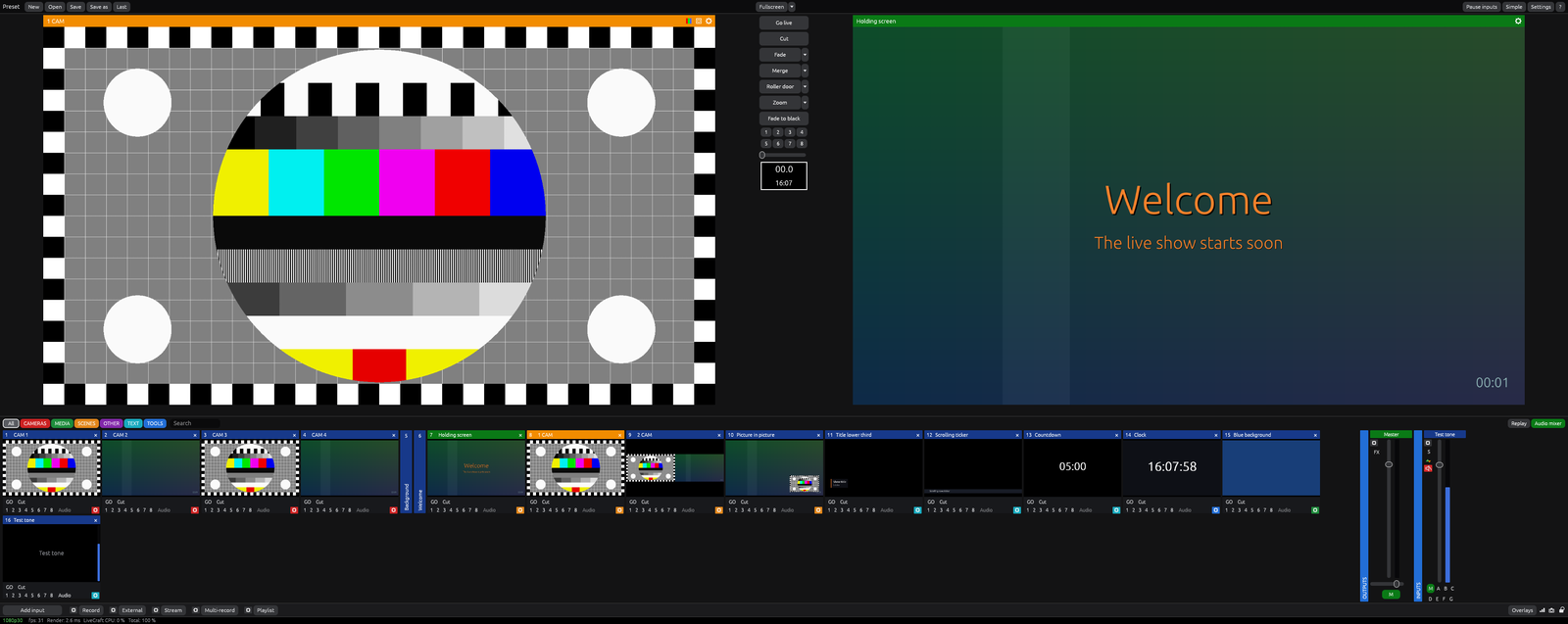
The LiveCraft desk: a test card in preview on the left, a Welcome holding screen on air on the right, transition buttons between them, a row of input cards below and the audio mixer at the bottom right.
The desk: preview on the left, program on the right, transitions between them, input cards and the audio mixer below. If you have run a show on a software mixer, you already know where everything is.

01 / Features

A whole control room in one program.

One native window holds the desk, the mixer, the recorders and the streams. No plug-in framework, no web wrapper.

  1. Composed on the graphics card

    The picture is put together on the GPU through DirectX 12 or Vulkan, with the CPU as a fallback. Files heavier than 1080p60 and network streams are decoded by the card, and software takes over by itself if it fails.

  2. Every source you have

    Cameras and microphones, video files, images, screen capture and system audio, web pages, SRT, RTMP, RTSP and TS streams, NDI and OMT, video calls from a guest's browser with the program sent back, PowerPoint presentations and DVDs.

  3. A real audio mixer

    Master and buses A to G, a gate, compressor, ten-band EQ and delay on every input, solo and headphones, several output devices. CLAP plug-ins on any input, bus or Master, saved with the project.

  4. Record and stream, several at once

    Two recorders, up to five stream destinations and separate recordings per input, with sound and picture on one shared clock. SRT output, and the program as an NDI or OMT source. NVENC, Quick Sync and AMF when your FFmpeg has them.

  5. Remote control built in

    One list of named functions sits behind every button, shortcut, trigger and script. Drive them from the web controller on a phone or tablet, or over HTTP and TCP. Remote control listens only on this computer until you turn network access on.

  6. Opens your .vmix shows

    Inputs, scenes and layers, overlays, tabs, colour settings, LUTs, audio routing and the state you left them in come across. Your file is never changed: you save a new .livecraft project.

Also on the desk

  • Cut, fade, zoom, wipes, slides, cubes, merge and stingers
  • Four transition slots and a T-bar
  • Fade to black and Quick Play
  • Scenes with layers
  • Eight overlay channels
  • Picture-in-picture
  • Virtual sets with a moving camera
  • Colour correction, keys and LUTs
  • Titles, tickers and countdowns
  • Instant replay with events and tags
  • Playlists and triggers
  • Data sources from CSV
  • Scripts
  • VISCA PTZ control
  • Telestrator
  • Multiview
  • French and English interface

02 / Screens

A closer look.

Taken from LiveCraft itself, in English. The interface follows the system language and also speaks French.

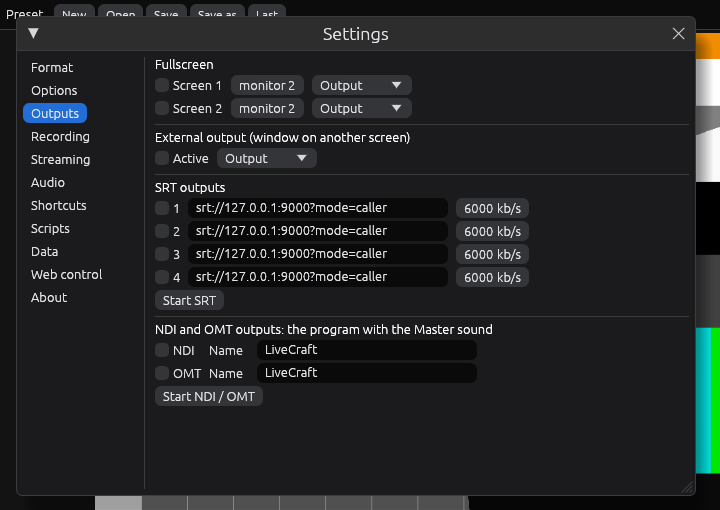
Settings, Outputs page: fullscreen on two screens, an external output window, four SRT outputs with their bitrate, and NDI and OMT outputs with a name each.
Outputs. Fullscreen on two screens, an external window, SRT outputs, and the program with the Master sound as an NDI or OMT source.
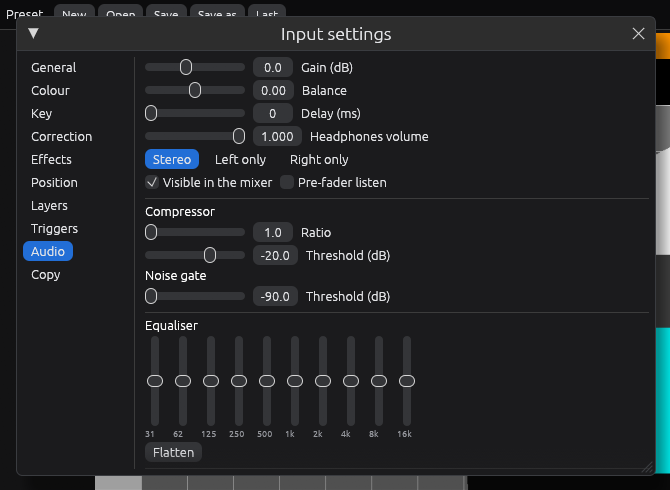
Input settings, Audio page: gain, balance, delay and headphones volume sliders, compressor, noise gate and a ten-band equaliser.
Audio per input. Gain, balance, delay, compressor, noise gate and a ten-band equaliser on every input.
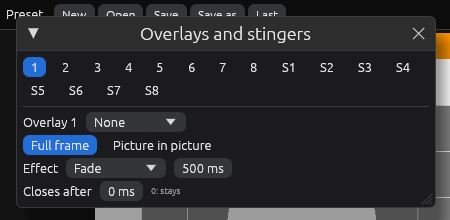
Overlays and stingers window: overlay channels 1 to 8 and stingers S1 to S8, with full frame or picture-in-picture, an effect, its duration and a close timer.
Overlays and stingers. Each overlay channel has its own effect, duration and close timer, full frame or picture-in-picture.
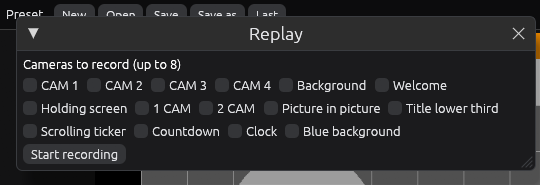
Replay window: a list of inputs to record, up to eight, and a Start recording button.
Instant replay. Pick up to eight cameras to record, then mark events and play them back.

03 / Why LiveCraft

Built to be yours.

  • Free and open source

    MIT or Apache-2.0, with no account, no licence key and no tier. Read the code, change it, ship it.

  • Native, in Rust

    Written from scratch in Rust, with egui for the window, wgpu on the graphics card and FFmpeg as a separate process for each source and output.

  • Light on purpose

    What nobody is watching costs next to nothing: cards are drawn at card size, pages off air slow down on their own, and all web inputs share a single browser.

  • Scriptable from the start

    The HTTP and TCP interfaces use the published function names, so existing control surfaces can connect.

04 / Download

Get the alpha.

Released builds are for Windows. Linux and macOS run from source for now, as an experiment; packaged builds for them will follow.

Windows

Installer or zip

Install in three steps

  1. Install FFmpeg, which is not included: winget install Gyan.FFmpeg
  2. Run the installer, or unzip the portable zip and start livecraft.exe.
  3. Alpha builds are not signed yet. If SmartScreen warns, click More info, then Run anyway. Checksums are in SHA256SUMS.txt.

Web inputs also need Chrome, Chromium or Edge, and presentations need Microsoft PowerPoint or LibreOffice. NDI and OMT are optional and loaded only when used. Install guide

Linux and macOS

Run from source

No packaged builds yet. You need Rust and FFmpeg on your PATH; Linux also needs the ALSA headers and pkg-config.

Terminal
# Debian or Ubuntu
sudo apt install libasound2-dev pkg-config ffmpeg
# macOS, with Homebrew
brew install ffmpeg

# Then, on both
git clone https://github.com/Wiibleyde/LiveCraft
cd LiveCraft
cargo run --release
  • Linux: FFmpeg needs v4l2, pulse and x11grab, as distribution builds have. Under Wayland, screen capture only sees windows of X programs.
  • macOS: allow the camera, the microphone and screen recording for the terminal that starts LiveCraft.

05 / Community

Early alpha. Your show is the test it needs.

LiveCraft has run on one Windows machine and on Linux under WSL; on macOS it is only built and tested by CI so far. It has not been tried with physical cameras, capture cards, PTZ heads or a live streaming platform, so it is not ready for a show that matters yet. Reports are worth more than features at this stage.